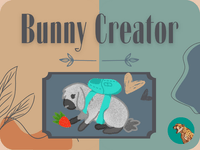
? Привет, welcome to the bunny-making paradise known as Bunny Creator!! ? If you're a fan of crafting and all things cute, you're in for a treat. This digital bunny workshop is not just for crafting enthusiasts; it's for every young artist and bunny lover out there who's ready to unleash their creativity.
How to Play
Jump into the world of Bunny Creator by clicking "Start" and getting ready to personalize your own fluffy friend. Here's a quick rundown of the steps:
- Fur Pattern Fun: Click on any of the blue buttons to change your bunny's fur pattern, color, and type of fur. From straight ears to fluffy lop ears, there's a fur type for every style!
- Accessories Galore: Once you're satisfied with the fur, move on to the accessories section. Pick from 21 unique items, and don't forget to customize the colors to your heart's desire.
- Feast and Play: Add some food and toys to make your bunny look extra adorable. Choose from 8 different options to complete the look.
- Background Beauty: Pick a background that complements your bunny's style, and remember to go into PFP mode for the perfect profile picture!
Cool Features
Bunny Creator isn't just about making cute bunnies; it's packed with features that make the experience special:
- 30 Unique Fur Patterns: Mix and match to create a one-of-a-kind look.
- 4 Different Fur Types: From fluffy to sleek, your bunny can have any style you imagine.
- 21 Accessories + Colors: Customize every detail to your liking.
- 8 Food & Toy Options: Give your bunny a lifestyle fit for a king or queen.
- 25+ Sprites: Choose from a variety of poses and expressions to capture your bunny's personality.
Controls Guide
- Use your mouse or touchpad to navigate through the options.
- Click on blue buttons to change fur patterns.
- Click on accessory items to change their color.
- Click "Next" to move to the next section.
- Click "Done" to finalize your creation.
- Enter PFP mode by clicking on the background you've chosen.
Important Tips
- Use the mute button (M) if you're not a fan of the music.
- If you're not sure which fur pattern or accessory to pick, remember that you can always click on the item to change it.
Customization and Suggestions
The creator of Bunny Creator has put a lot of thought into making this experience as personalized as possible. They've even mentioned that they're open to suggestions for new fur patterns, accessories, backgrounds, and more. If you have a specific idea in mind, be sure to let them know!
Closing Thoughts
So, there you have it, the Bunny Creator experience! Whether you're crafting a bunny for your profile picture or just for fun, this game is sure to bring a smile to your face. With so many customization options, your bunny can be as unique as you are. So dive in, have fun, and let your creativity run wild!
If you've enjoyed your time at the Bunny Creator workshop, don't forget to show some love by giving hearts and stars. The creator would also appreciate any feedback or suggestions you have in the comments. Happy bunny crafting! ??
Играй в Создатель Кроликов! на своем мобильном устройстве

Отсканируй QR-код камерой своего мобильного устройства, чтобы сыграть в Создатель Кроликов!
Ты можешь наслаждаться этой игрой на мобильных устройствах и планшетах (например, iPhone, iPad и Android)